Physical Address
304 North Cardinal St.
Dorchester Center, MA 02124
Physical Address
304 North Cardinal St.
Dorchester Center, MA 02124


Google Analytics 4 has introduced a dedicated Lead Acquisition report designed for a deeper analysis of how potential customers are acquired. Unlike basic traffic reports, this tool focuses on business-relevant events such as inquiries, form submissions, and subscriptions. In this article, I’ll explain how the report works and how to use it to evaluate your marketing effectiveness.
This report is part of the Acquisition section in GA4 and shows the user’s journey from their first interaction with your site to the completion of a target action.

The report uses three main metrics:
There is also the User key event rate metric – the percentage of users who completed a key action. This is calculated by dividing the number of users who performed a key event by the total number of users. You can choose which key events to track.

Businesses focused on lead generation need to understand not only how much traffic they receive but also the quality of those users. This report helps you:
For example, if you advertise your service through Google Ads or LinkedIn, the Lead Acquisition report will show how many leads came from each channel, how many were qualified, and how many converted. This allows for a more accurate evaluation of the ROI for each channel.
To make the report work properly, you need to configure the recommended key events in GA4: generate_lead, qualify_lead, and close_convert_lead.
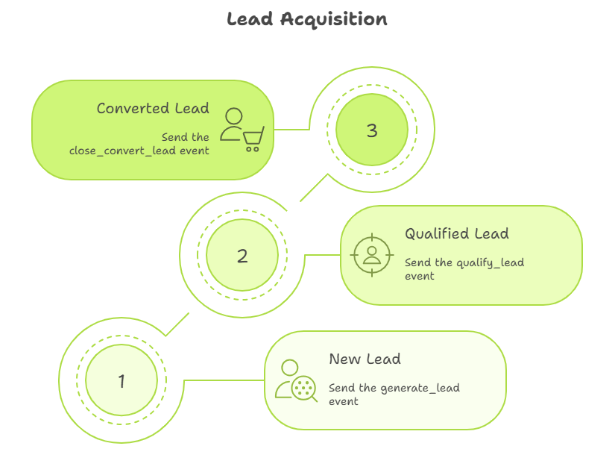
To get a full picture of the lead funnel, you should send events to GA4 that reflect the stages of initial interest, qualification, and conversion. Below are recommendations for each event:
1. generate_lead – New Lead Creation
This event captures the user’s initial interest, i.e., the moment when they show intent to provide their contact info or interact with an element indicating interest.
Examples of what can be considered generate_lead:
This event can be configured using Google Tag Manager.
2. qualify_lead – Lead Qualification
This event confirms that a lead is targeted, meaning they meet certain business criteria.
Examples of what can be considered a qualified lead event:
Depending on your criteria, this event can be triggered on the website or within the CRM and passed to GA4 via Measurement Protocol or an integration.
3. close_convert_lead – Final Conversion
This event represents the completion of the funnel stage – a valuable business action. It can also be passed from your CRM via Measurement Protocol, or tracked on the site if the transaction happens immediately.
Examples of what can be considered a close_convert_lead event:
Learn more about setting up the Lead Acquisition report in the official Google documentation.
You can also find the complete list of recommended events for tracking lead generation (including disqualify_lead and close_unconvert_lead) here.
The Lead Acquisition report is a valuable tool for anyone working with leads and seeking insight beyond just website traffic. Using it helps you assess the effectiveness of your customer acquisition strategies and make more informed marketing decisions.